Example: The Harbour Key
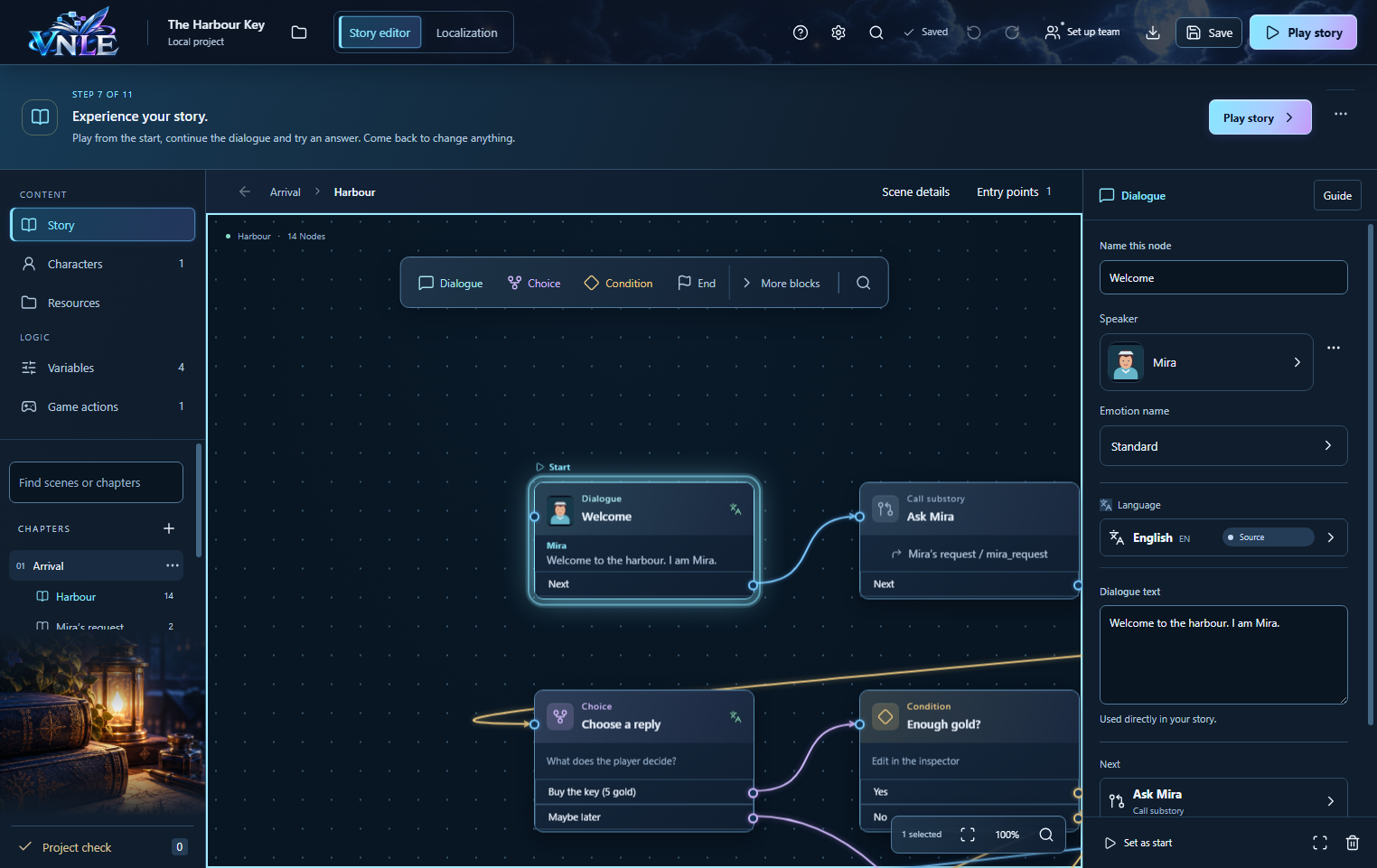
Mira watches over a locked warehouse. You can buy a key from her for five gold pieces. Your game receives the item, the conversation takes you to the warehouse and the quest is completed. The example contains three scenes and all nine node types.
Download the example project · Play in your browser
1 · Open the project
- Download the example project and extract the ZIP.
- Start VNLE. Choose Open project and select the extracted project folder, which contains project.vnle.json.
- Select Harbour in the left sidebar. Select a node to see its contents on the right. This guide uses English controls. You can change the app language in Settings.
2 · Character, values and items
Open Characters: Mira has a name and a portrait. A dialogue selects Mira as its speaker, so your game can show her name and image alongside the line.
Under Variables you will find Gold = 10, with HasKey, QuestAccepted and QuestComplete = false. An integer counts gold pieces. The three boolean values remember progress.
Resources contains the Warehouse key item, the Open the warehouse quest and the Old warehouse location. These entries give the game stable references. The included game example manages the visible inventory.
3 · Follow the conversation
- Welcome greets you. Ask Mira calls Mira’s request. Another dialogue explains the warehouse; Return takes you back to the main conversation.
- Already have the key? checks HasKey. Without a key, Choose a reply appears. Choose to buy or select Maybe later.
- Enough gold? checks Gold ≥ 5. If you cannot afford it, Mira declines. Otherwise Pay five gold subtracts five gold pieces and sets QuestAccepted to true.
- Receive the key requests give_item. The game adds the key to the inventory and returns the Received outcome. Remember the key sets HasKey to true.
- Your remaining gold shows your current gold in the line. Go to the warehouse jumps to Warehouse. Check the warehouse key checks the key, sets QuestComplete and shows the final dialogue.
- Return to the game is an End node: your game closes the dialogue box and returns control.
4 · Try every route
- Open Play in your browser. Choose Talk to Mira, Continue twice and buy the key. Expect Gold 5, the key in your inventory and eventually Quest complete.
- Restart with Start with 2 gold. The purchase is refused and the inventory stays empty. Then try the Maybe later reply.
- Switch between English and Deutsch during a line. The same line stays open. After buying, choose Save game, continue and use Load game to return.
When adding game actions, connect their cancellation outcomes too. In the example, Refund the payment returns the five gold pieces and resets QuestAccepted if the inventory rejects the item. A farewell follows.